NestedScrolling详解

简介

假设我们需要一个这样的效果,拖动子View的时候需要parent先滑动,等parent滑倒顶端的时候再让子View滑动。Android事件分发机制在parent处理事件的时候,没法再次把事件传递给子View(除非再来一个Down,开启一个新的事件序列),所以就需要用到NestedScrolling,也就是嵌套滑动机制。今天我们来实现如下效果
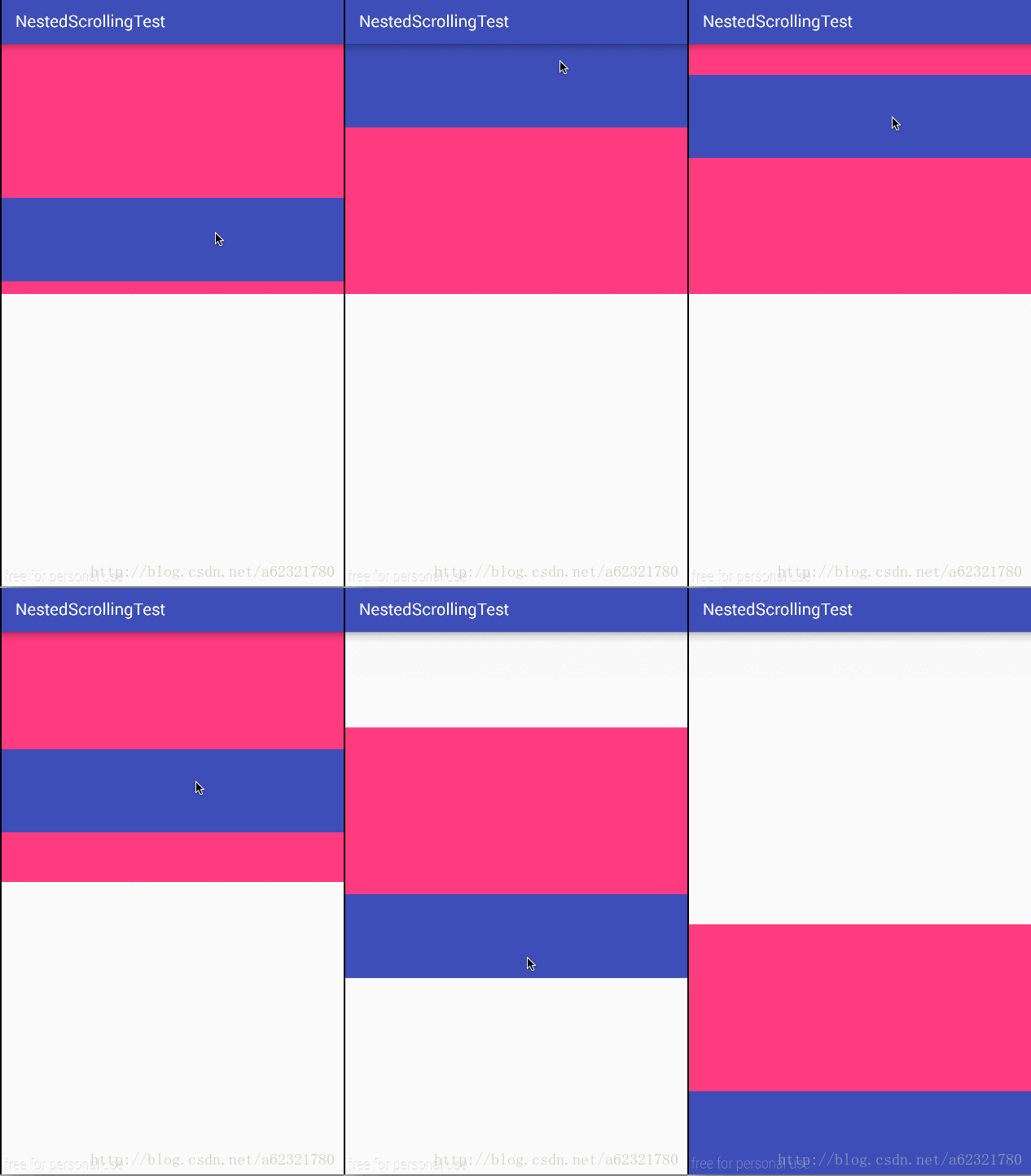
这里写图片描述
蓝色部分是子View,粉色是Parent,在向上滑动时,保证Parent首先滑动到顶端,向下滑动时保证子View首先滑倒底部。

基本类和方法

这里需要用到两个接口

1
2
NestedScrollingChild
NestedScrollingParent

和两个辅助类

1
2
NestedScrollingChildHelper
NestedScrollingParentHelper

NestedScrollingChild

子View实现这个接口

1
2
3
4
5
6
7
8
9
10
11
12
13
14
15
16
17
18
19

public void setNestedScrollingEnabled(boolean enabled);

public boolean isNestedScrollingEnabled();

public boolean startNestedScroll(int axes);

public void stopNestedScroll();

public boolean hasNestedScrollingParent();

public boolean dispatchNestedScroll(int dxConsumed, int dyConsumed,
int dxUnconsumed, int dyUnconsumed, int[] offsetInWindow);

public boolean dispatchNestedPreScroll(int dx, int dy, int[] consumed, int[] offsetInWindow);

public boolean dispatchNestedFling(float velocityX, float velocityY, boolean consumed);

public boolean dispatchNestedPreFling(float velocityX, float velocityY);
  • void setNestedScrollingEnabled(boolean enabled):允许嵌套滑动
  • boolean startNestedScroll(int axes):一般在ACTION_DOWN的事件里调用,表示要开始滑动,axes代表方向,有SCROLL_AXIS_VERTICAL、SCROLL_AXIS_HORIZONTAL两种
  • boolean dispatchNestedPreScroll(int dx, int dy, int[] consumed, int[] offsetInWindow):一般在ACTION_MOVE种调用,dx、dy是将要滑动的量,然后分发给Parent让他消耗,consumed是一个二维数组,分别存储Parent消耗的x、y方向上的量,如果无消耗那么返回false。

NestedScrollingParent

Parent实现这个接口

1
2
3
4
5
6
7
8
9
10
11
12
13
14
15
16
public boolean onStartNestedScroll(View child, View target, int nestedScrollAxes);

public void onNestedScrollAccepted(View child, View target, int nestedScrollAxes);

public void onStopNestedScroll(View target);

public void onNestedScroll(View target, int dxConsumed, int dyConsumed,
int dxUnconsumed, int dyUnconsumed);

public void onNestedPreScroll(View target, int dx, int dy, int[] consumed);

public boolean onNestedFling(View target, float velocityX, float velocityY, boolean consumed);

public boolean onNestedPreFling(View target, float velocityX, float velocityY);

public int getNestedScrollAxes();
  • void onNestedPreScroll(View target, int dx, int dy, int[] consumed):子View调用dispatchNestedPreScroll的时候此方法会被回调,通过判断dx、dy来计算消耗,返回消耗值。

然而真正的逻辑实现都由Helper类帮我们实现了,我们只需要调用helper类的对应方法即可,接下来开始写代码。

ChildView代码

1
2
3
4
5
6
7
8
9
10
11
12
13
14
15
16
17
18
19
20
21
22
23
24
25
26
27
28
29
30
31
32
33
34
35
36
37
38
39
40
41
42
43
44
45
46
47
48
49
50
51
52
53
54
55
56
57
58
59
60
61
62
63
64
65
66
67
68
69
70
71
72
73
74
75
76
77
78
79
80
81
82
83
84
85
86
87
88
89
90
91
92
93
94
95
96
97
98
99
100
101
102
103
104
105
106
107
108
109
110

/**
* @author wulinpeng
* @datetime: 17/6/17 下午10:34
* @description:
*/
public class ChildView extends View implements NestedScrollingChild {

private NestedScrollingChildHelper helper;

private float lastY = 0;

private int[] consume = new int[2];

private int[] offset = new int[2];

public ChildView(Context context, @Nullable AttributeSet attrs) {
super(context, attrs);
init();
}

private void init() {
helper = new NestedScrollingChildHelper(this);
helper.setNestedScrollingEnabled(true);
}

@Override
public boolean onTouchEvent(MotionEvent event) {
switch (event.getAction()) {
case MotionEvent.ACTION_DOWN:
lastY = event.getY();
// 开始垂直的滑动
helper.startNestedScroll(SCROLL_AXIS_VERTICAL);
break;
case MotionEvent.ACTION_MOVE:
// 获得滑动量
int dy = (int) (event.getY() - lastY);
if (dy < 0) {
// 向上滑动的逻辑,保证parent消耗,才到自己
if (!helper.dispatchNestedPreScroll(0, (int) dy, consume, offset)) {
// 运行到这说明parent不消耗了,parent已经到达顶部,这时候自身滑动
// 因为向上滑动dy < 0,所以*-1方便比较
int space = (int) getY() * -1;
int consumeY = Math.max(space, dy);
setY(getY() + consumeY);
}
} else {
// 向下滑动的逻辑,保证自己消耗,才到parent
int space = (int) (((ParentView) getParent()).getHeight() - getY() - getHeight());
int consumeY = Math.min(space, dy);
dy -= consumeY;
setY(getY() + consumeY);
// 自己消耗完后,然后传给Parent剩下的dy-consumeY
helper.dispatchNestedPreScroll(0, (int) dy, consume, offset);
}
break;
case MotionEvent.ACTION_UP:

break;
}
return true;
}

@Override
public void setNestedScrollingEnabled(boolean enabled) {
helper.setNestedScrollingEnabled(enabled);
}

@Override
public boolean isNestedScrollingEnabled() {
return helper.isNestedScrollingEnabled();
}

@Override
public boolean startNestedScroll(int axes) {
return helper.startNestedScroll(axes);
}

@Override
public void stopNestedScroll() {
helper.stopNestedScroll();
}

@Override
public boolean hasNestedScrollingParent() {
return helper.hasNestedScrollingParent();
}

@Override
public boolean dispatchNestedScroll(int dxConsumed, int dyConsumed, int dxUnconsumed, int dyUnconsumed, int[] offsetInWindow) {
final boolean b = helper.dispatchNestedScroll(dxConsumed, dyConsumed, dxUnconsumed, dyUnconsumed, offsetInWindow);
return b;
}

@Override
public boolean dispatchNestedPreScroll(int dx, int dy, int[] consumed, int[] offsetInWindow) {
final boolean b = helper.dispatchNestedPreScroll(dx, dy, consumed, offsetInWindow);
return b;
}

@Override
public boolean dispatchNestedFling(float velocityX, float velocityY, boolean consumed) {
return helper.dispatchNestedFling(velocityX, velocityY, consumed);
}

@Override
public boolean dispatchNestedPreFling(float velocityX, float velocityY) {
return helper.dispatchNestedPreFling(velocityX, velocityY);
}
}

注释比较清楚了,主要就是方向不同逻辑不同,向上的时候先分发给Parent,如果Parent不消耗了(返回false,也就是说到达顶部了),那么自己消耗dy(向上滑动,注意越界情况);向下的时候,首先自己向下滑动(自己消耗dy),然后给Parent分发消耗后的dy。

ParentView代码

1
2
3
4
5
6
7
8
9
10
11
12
13
14
15
16
17
18
19
20
21
22
23
24
25
26
27
28
29
30
31
32
33
34
35
36
37
38
39
40
41
42
43
44
45
46
47
48
49
50
51
52
53
54
55
56
57
58
59
60
61
62
63
64
65
66
67
68
69
/**
* @author wulinpeng
* @datetime: 17/6/17 下午10:37
* @description:
*/
public class ParentView extends FrameLayout implements NestedScrollingParent {

private NestedScrollingParentHelper helper;

public ParentView(@NonNull Context context, @Nullable AttributeSet attrs) {
super(context, attrs);
init();
}

private void init() {
helper = new NestedScrollingParentHelper(this);
}

@Override
public void onNestedPreScroll(View target, int dx, int dy, int[] consumed) {
FrameLayout parent = (FrameLayout) getParent();
if (dy > 0) {
// 向下滑动
int space = (int) (parent.getHeight() - getY() - getHeight());
int consumeY = Math.min(dy, space);
consumed[1] = consumeY;
setY(getY() + consumeY);
} else {
// 向上滑动
int space = (int) (getY() * -1);
int consumeY = Math.max(dy, space);
consumed[1] = consumeY;
setY(getY() + consumeY);
}
}

@Override
public boolean onNestedFling(View target, float velocityX, float velocityY, boolean consumed) {
return true;
}

@Override
public boolean onNestedPreFling(View target, float velocityX, float velocityY) {
return true;
}

@Override
public int getNestedScrollAxes() {
return helper.getNestedScrollAxes();
}
@Override
public boolean onStartNestedScroll(View child, View target, int nestedScrollAxes) {
return true;
}

@Override
public void onNestedScrollAccepted(View child, View target, int nestedScrollAxes) {
helper.onNestedScrollAccepted(child, target, nestedScrollAxes);
}

@Override
public void onStopNestedScroll(View target) {
helper.onStopNestedScroll(target);
}

@Override
public void onNestedScroll(View target, int dxConsumed, int dyConsumed, int dxUnconsumed, int dyUnconsumed) {
}
}

比较简单,主要是注意越界的情况,接下来只要在布局文件里将ChildView设置为ParentView的child就可以了。

源码解析

但是这两者到底是怎么样联系起来的呢?我们看看Helper类的源码

1
2
3
4
5
6
7
8
9
10
11
12
13
14
15
16
17
18
19
20
21
22
public boolean startNestedScroll(int axes) {
if (hasNestedScrollingParent()) {
// Already in progress
return true;
}
if (isNestedScrollingEnabled()) {
ViewParent p = mView.getParent();
View child = mView;
while (p != null) {
if (ViewParentCompat.onStartNestedScroll(p, child, mView, axes)) {
mNestedScrollingParent = p;
ViewParentCompat.onNestedScrollAccepted(p, child, mView, axes);
return true;
}
if (p instanceof View) {
child = (View) p;
}
p = p.getParent();
}
}
return false;
}

startNestedScroll是最开始要调用的,作用就是把这个Child和Paren联系起来,内部首先寻找可用的Parent,然后回调Parent的onStartNestedScroll方法,如果返回true,那么就给内部的mNestedScrollingParent赋值同时回调Parent的onNestedScrollAccepted方法,否则mNestedScrollingParent还是null。如果已经有了Parent那么直接返回true,可以知道这个方法调用一次就可以了,只要和Parent联系起来就ok。

1
2
3
4
5
6
7
8
9
10
11
12
13
14
15
16
17
18
19
20
21
22
23
24
25
26
27
28
29
30
31
32
33
34
public boolean dispatchNestedPreScroll(int dx, int dy, int[] consumed, int[] offsetInWindow) {
if (isNestedScrollingEnabled() && mNestedScrollingParent != null) {
if (dx != 0 || dy != 0) {
int startX = 0;
int startY = 0;
if (offsetInWindow != null) {
mView.getLocationInWindow(offsetInWindow);
startX = offsetInWindow[0];
startY = offsetInWindow[1];
}

if (consumed == null) {
if (mTempNestedScrollConsumed == null) {
mTempNestedScrollConsumed = new int[2];
}
consumed = mTempNestedScrollConsumed;
}
consumed[0] = 0;
consumed[1] = 0;
ViewParentCompat.onNestedPreScroll(mNestedScrollingParent, mView, dx, dy, consumed);

if (offsetInWindow != null) {
mView.getLocationInWindow(offsetInWindow);
offsetInWindow[0] -= startX;
offsetInWindow[1] -= startY;
}
return consumed[0] != 0 || consumed[1] != 0;
} else if (offsetInWindow != null) {
offsetInWindow[0] = 0;
offsetInWindow[1] = 0;
}
}
return false;
}

这个方法首先判断isNestedScrollingEnabled和mNestedScrollingParent,如果mNestedScrollingParent==null也就是Parent在onStartNestedScroll返回了false,那么就不会收到这个分发。方法内部回调了Parent的onNestedPreScroll方法,然后判断consume的两个值,如果都是0,那么说明Parent没有消耗,就返回false表示Parent不消耗。

总结

其实就是NestedScrollingChild发出各种事件,比如最开始的startNestedScroll来寻找可用的Parent同时回调Parent的方法,dispatchNestedPreScroll分发偏移量给Parent让它先消耗,而NestedScrollParent只是被动接受各种回调作出处理,比如在onStartNestedScroll返回boolean表示是否接受嵌套滑动,在onNestedPreScroll消耗滑动偏移量。其实高版本的View默认实现了这些方法,但是为了兼容低版本,我们是用Helper来实现,其实实现代码是一样的。